The best mic stand for AT2020 depends on the recording position: a compact tabletop stand for a simple desk setup, a boom arm for frequent repositioning or a floor stand when the microphone needs to sit away from the desk. These five options cover all three formats. Choose the format first, then compare the mounting, working reach and complete microphone load.

A useful stand holds the microphone securely and places it close to the sound source. It does not automatically improve the microphone’s sound or replace a shock mount. For a basic tabletop setup, the compact DS7200C is the overall choice here.
Top 5 Best Mic Stands for AT2020
| Model | Price |
|---|---|
| RØDE PSA1+ | Check Price |
| On-Stage MS7701C | Check Price |
| LyxPro TMS-1 | Check Price |
| On-Stage DS7200C (Editor's Choice) | Check Price |
| TONOR TN-459 | Check Price |
RØDE PSA1+
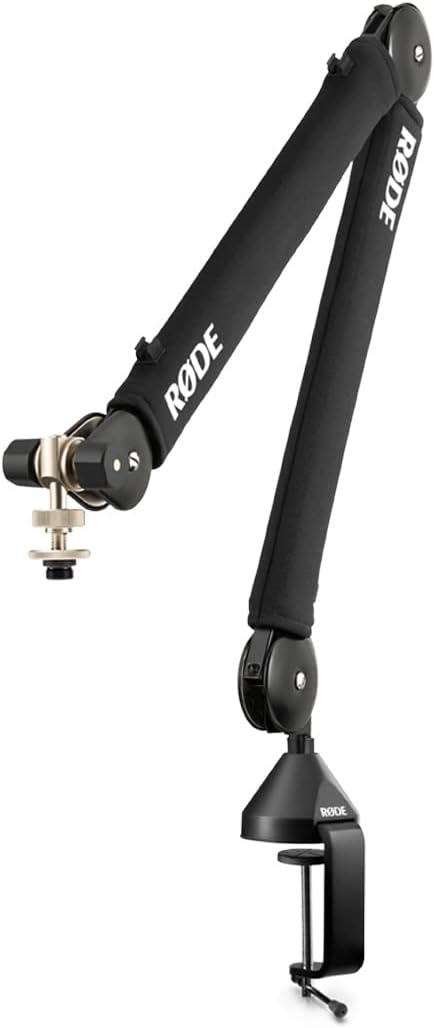
The PSA1+ is the more appropriate RØDE arm for a light AT2020 setup. Its supported microphone-and-mount range starts at 94 g and extends to 1.2 kg, so the AT2020’s 345 g body sits comfortably inside the range before mounting accessories are added.
Its useful features go beyond load capacity. Damped internal springs and covered arm sections reduce noise from the mechanism, while cable clips help keep the microphone lead under control. The parallelogram layout retains the microphone’s orientation as you move the arm.
This is the better choice when frequent repositioning matters: bring the microphone in for a recording, then park it clear of the screen afterward. It still needs a suitable desk clamp location or insert mounting point, and it does not eliminate vibration coming through the desk. For an occasional tabletop recording, the simpler DS7200C may be all you need.
Features
- PSA1+ supports a combined microphone-and-mount load of 94 g–1.2 kg.
- Damped springs, covered arm sections and cable-management clips.
Pros
- The load range suits a lightweight AT2020 assembly.
- Convenient movement between recording and parked positions.
Cons
- Needs desk-edge clearance or insert mounting.
- Does not replace a shock mount for desk-transmitted vibration.
On-Stage MS7701C

The MS7701C is the more flexible format when recording extends beyond a desk. Its floor-standing tripod and removable 30-inch boom let you position the AT2020 for vocals or an instrument without needing furniture to clamp onto.
Separate boom-angle and extension adjustments help place the microphone while the folding legs make storage easier. The 5/8-inch-27 thread matches the AT2020’s supplied stand mount, keeping the mechanical connection straightforward.
The compromise is floor space and balance. A boom extended far beyond the tripod creates more leverage than an upright microphone, so place a leg under the load and keep the extension sensible. It is a practical general-purpose stand, not a substitute for a purpose-built heavy-duty overhead rig.
Features
- Floor-standing tripod with a removable 30-inch boom.
- 5/8-inch-27 mounting thread and folding legs.
Pros
- Works away from a desk for vocals and instruments.
- Removable boom adds positioning flexibility.
Cons
- Tripod legs can crowd a small room.
- Long extensions need careful balancing.
LyxPro TMS-1

The TMS-1 offers another portable floor-stand layout. Its folding tripod and adjustable upright make it useful when the microphone needs to move between a desk, a standing vocalist and an instrument setup.
The boom provides offset positioning, and the 3/8-inch and 5/8-inch mounting arrangement gives flexibility with common microphone fittings. With the AT2020, use the microphone’s proper stand mount rather than trying to hold its body in a generic handheld-mic clip.
This is a straightforward choice for occasional repositioning and storage. The trade-off is the same one that comes with a lightweight folding format: the stand needs a stable surface and sensible boom extension. It will not isolate footfalls or compensate for a microphone positioned too far from the sound source.
Features
- Folding tripod with an adjustable upright and boom.
- Common 3/8-inch and 5/8-inch mounting compatibility.
Pros
- Portable format for changing recording positions.
- No desk clamp or permanent installation required.
Cons
- Needs floor clearance and careful placement.
- A light tripod is less forgiving at long boom extensions.
On-Stage DS7200C (Editor’s Choice)
The DS7200C is the simplest recommendation here for a basic tabletop AT2020 setup. Its straight shaft adjusts from 9 to 13 inches, and a six-inch round base weighing two pounds keeps the format compact without relying on a spring arm’s minimum load.
That makes it useful for a desk, tabletop interview or other low-height position where the microphone can sit close enough to the speaker. There is no clamp to fit around a desk edge, and fewer joints mean fewer adjustments between sessions.
Its limitation is reach. You must place the base near the recording position; it cannot extend past a monitor like a boom arm. The stand can also carry desk movement into the microphone. Positioning and a suitable shock mount remain relevant if keyboard noise or handling vibration is a problem.
Features
- Desktop stand with a 9–13-inch height range.
- Six-inch round base; two-pound base weight.
Pros
- Straightforward match for a compact tabletop recording position.
- No desk-edge clamp or spring-balancing requirement.
Cons
- Limited reach compared with a boom arm.
- Uses desk space and can transmit desk vibration.
TONOR TN-459

The TN-459 is a compact desk-clamp arm for a light microphone setup. Its folding scissor layout moves the microphone above the work surface, leaving more room around a keyboard than a tabletop base.
The listed maximum load is 2.2 pounds, roughly 1 kg. Count the AT2020, its mount and any attached accessories together, and keep the microphone closer to the desk support if a long extension makes the arm less stable. The exact mounting adapter still needs to match the microphone’s stand mount.
This is a functional way to gain desk reach without a large studio arm. Its exposed spring-and-joint layout needs more attention to cable routing: leave slack at the joints and keep the XLR cable from pulling on the microphone or snagging as the arm folds.
Features
- TN-459 folding desk-clamp scissor arm.
- Listed maximum microphone load of 2.2 pounds.
Pros
- Moves the microphone base off the desktop.
- Folds away between recording sessions.
Cons
- Clamp placement and extension affect stability.
- Cable routing needs care around the moving joints.
Different Stands for Different Plans
Choose the format before comparing small features. A desk arm gives reach and clears the work surface. A floor stand works around the room and beside instruments, while a compact desktop stand is useful when the microphone can sit close to the speaker.
The XLR Audio-Technica AT2020 includes a mount for 5/8-inch-27 stands and a 5/8-inch-27 to 3/8-inch-16 adapter. USB versions and retailer bundles may include different accessories. A suitable mount must match both the microphone and the stand; a generic microphone clip is not automatically a fit for the AT2020’s body.
Weigh the microphone with its mount before choosing a spring-balanced arm. Both minimum and maximum loads matter. The PSA1+ supports assemblies from 94 g to 1.2 kg; count the microphone, mount and any attached accessories together rather than comparing the bare microphone with the maximum rating alone.
For desk-based audio recording, account for keyboard noise, cable movement and vibration through the furniture. A shock mount may reduce some mechanical noise, but an arm alone does not soundproof the recording. Keep enough cable slack for movement without letting the connector carry the cable’s weight.
A floor stand can help with overhead drum microphone positioning or acoustic instruments such as guitars, but only within the stand’s stable reach and load. A wide tripod does not make every fully extended setup safe from tipping.
Position the AT2020 Before Choosing the Stand
Plan where the microphone needs to be while you are actually recording, not just where an empty stand fits on the desk.
- Start with your recording posture. Sit or stand as you normally would, then identify a microphone position that does not force you to lean around a screen or keyboard.
- Face the correct side toward the source. The XLR AT2020 is a side-address microphone: its Audio-Technica logo faces the sound source. Moving the stand cannot compensate for aiming the microphone the wrong way.
- Check the whole movement. A desk arm needs a suitable clamp location and enough reach. A floor boom needs stable clearance around its base. A tabletop stand needs a surface that puts the microphone within useful reach.
- Count the attached parts. Include the microphone, its mount or shock mount and any accessories when checking an arm’s supported load. Leave cable slack for movement without pulling on the connector.
The Audio-Technica AT2020 manual shows the microphone’s orientation and supplied mount. Confirm the accessories for the exact microphone version before choosing an adapter. With the position and mounting settled, the differences between a tabletop base, desk arm and floor stand become much easier to judge.
Summary: What’s the Best Mic Stand for AT2020?
The DS7200C is the overall choice here for a simple tabletop setup: it is compact, height-adjustable and does not rely on spring balancing for a light microphone. The MS7701C and TMS-1 are better formats when recording away from the desk.
The TONOR TN-459 offers a folding desk-arm layout, while the PSA1+ is the more refined choice when frequent repositioning and cable management matter. Match the stand to the complete setup, then check that it puts the microphone where you need it.
For a different microphone, our comparison of mic stands for Blue Yeti and Blue Snowball explains the load and mounting considerations for those USB models.