The best audio interface under $300 should make recording easier, whether the plan is a vocal and guitar track, a two-person podcast or music for a video. Useful inputs, clear monitoring controls and dependable driver support matter more than a long list of bundled plug-ins.
For a DAW-specific comparison, see our separate guide to audio Interface for Cubase and check the current driver and operating-system requirements.
These five options cover simple recording, two-input music production and compact mixing. The Scarlett Solo remains the straightforward pick for one microphone and an instrument; the MOTU M2 adds more flexible connections and detailed metering. Match the hardware to the sources you actually need to record, and compare the exact generation rather than assuming every model with the same family name is identical.
Top 5 Best Audio Interfaces Under $300
Focusrite Scarlett Solo 2nd Gen (Editor’s Choice)
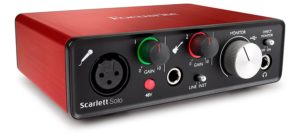
The second-generation Scarlett Solo is the overall choice for a simple one-person recording setup. One XLR microphone input and a separate switchable line/instrument input let a singer record a vocal and guitar together without the extra controls of a mixer. The compact metal enclosure is easy to accommodate on a desk or carry alongside a laptop.
The gain controls use illuminated halos to help set input levels, and the Direct Monitor switch lets the live inputs reach the outputs without making a round trip through the recording software. That is useful for hearing a natural voice or instrument while tracking. It does not include the sound of a software amp or plug-in effect in that direct path.
Recording supports up to 24-bit/192kHz, although a sensible 44.1 or 48kHz project is often all the job needs. The more important limitation is connectivity: there is only one microphone preamp, and the rear speaker outputs are unbalanced RCA. A stereo microphone pair or two-person XLR podcast calls for a two-preamp model instead.
This is specifically the second-generation Solo, without the Air mode or other features of later Scarlett generations. Its appeal is a clear, uncluttered workflow rather than a promise of the newest controls. Focusrite still provides current Windows drivers, while Mac operation is class compliant; the exact operating-system requirements remain worth checking when setting up any interface.
Pros
- Records one microphone and one line/instrument source simultaneously
- Direct monitoring and illuminated gain indicators
- Compact USB-powered metal design
Cons
- Only one microphone preamp
- Unbalanced RCA monitor outputs; no later-generation Air mode
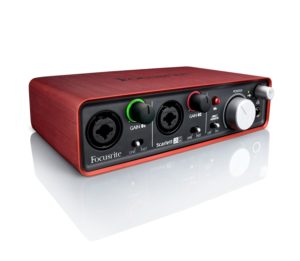
Focusrite Scarlett 2i2 1st Gen
The original Scarlett 2i2 is the more flexible of these two older Scarletts when two microphones are required. Both front-panel combo inputs accept an XLR microphone or a quarter-inch line/instrument connection, so the same small box can handle an interview, a vocal and acoustic-guitar microphone, or a stereo line source.
Each input has its own gain control and line/instrument switch. A shared 48V switch supplies the microphone inputs, and the direct-monitor switch provides a simple way to hear the live signal while recording. Balanced quarter-inch TRS outputs are a useful practical advantage over the Solo’s RCA connections when feeding suitable studio monitors.
The first-generation model supports up to 24-bit/96kHz. It does not have the Air, Auto Gain or Clip Safe functions of later Scarletts, but its basic two-input layout remains useful. Focusrite continues to provide Windows drivers for this generation, and the Mac connection is class compliant.
The reason to choose it is the combination of two microphone inputs and straightforward controls. There is no MIDI connection or onboard effects processor, and the direct-monitor switch offers less flexibility than a dedicated input/playback blend knob. Treat software bundles as a separate purchase consideration rather than assuming an old registration code will supply every plug-in named in an early advertisement.
Pros
- Two independently adjustable mic/line/instrument inputs
- Balanced TRS monitor outputs
- Simple direct-monitor switch and separate headphone level
Cons
- No MIDI or onboard effects
- 96kHz maximum and fewer monitoring options than some newer interfaces
Behringer XENYX 302USB
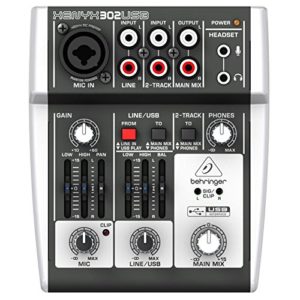
The XENYX 302USB is the option for someone who wants to mix a few sources by hand before they reach the computer. It combines one microphone/line combo input with stereo line and two-track connections, putting levels, pan or balance and basic tone shaping on the desk rather than inside an application.
The microphone and line/USB sections have two-band EQ, and the routing switches determine where the playback sources are heard. Those controls are useful for combining speech and a backing track, or making a quick level adjustment during a simple stream. The small footprint is an advantage when a conventional desktop mixer would take up too much room.
The important distinction is that the USB connection carries a stereo mix, not five independently editable recording tracks. Its converter is specified at 16-bit/48kHz. That is a different workflow from recording separate sources through the Scarlett or MOTU and deciding their balance later in a DAW.
Choose it for accessible mixing controls and uncomplicated stereo capture, rather than a demanding multitrack session. There is only one microphone channel, and a microphone’s power requirements need to match the mixer’s supply. A condenser microphone should not be chosen on the assumption that every phantom-powered input provides the same voltage.
Pros
- Physical level, pan/balance and two-band EQ controls
- Compact mixer with integrated stereo USB audio
- Useful line, two-track and playback routing
Cons
- USB records a stereo mix rather than separate mixer channels
- One microphone channel and 16-bit/48kHz conversion
MOTU M2
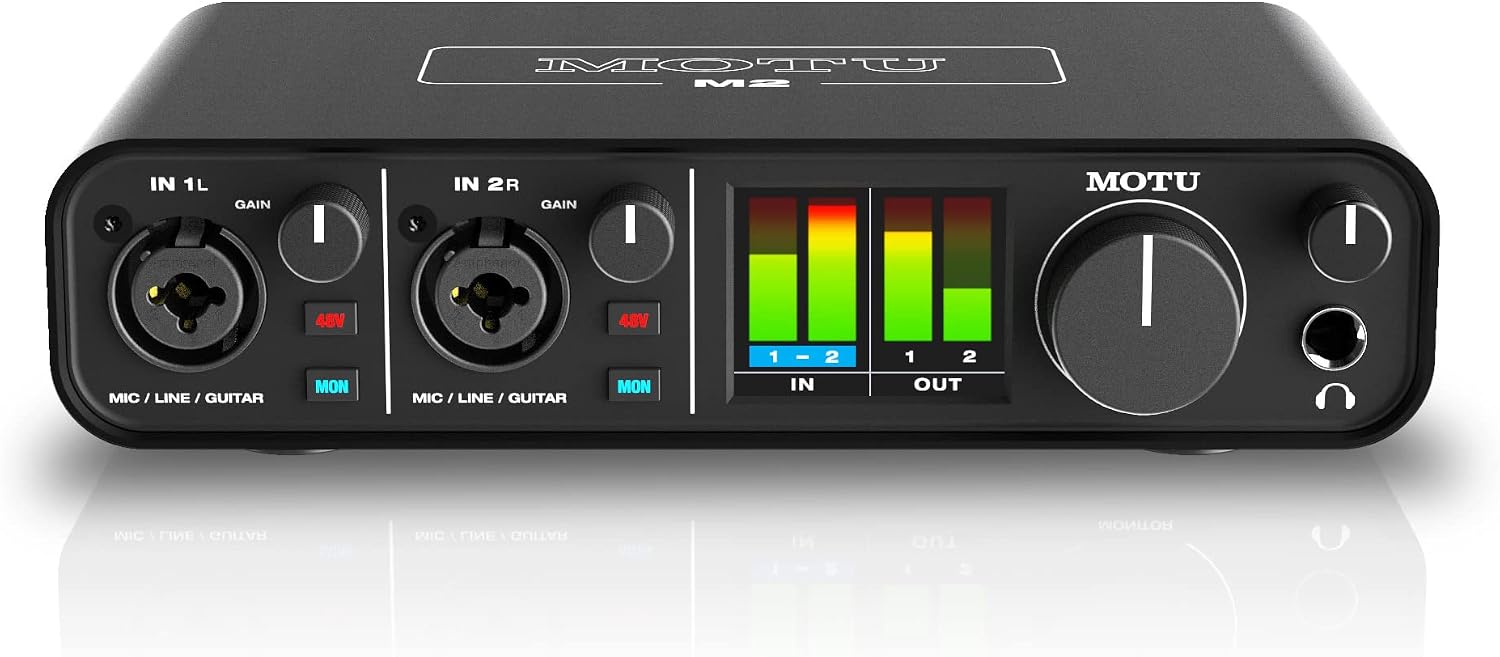
The M2 is the strongest option here for someone who values visible levels and flexible connections. Its color LCD shows proper input and output meters, making it easier to see recording headroom and playback activity than with a single signal light. Two front-panel combo inputs cover microphones, line sources and guitars.
Each input has its own 48V and direct-monitor buttons. That makes it possible to hear a live source through the hardware while keeping the monitoring choice accessible on the front panel. The headphone level is independent of the main output control, another welcome detail when switching between recording and listening on monitors.
Balanced TRS outputs serve suitable studio speakers, with RCA outputs mirroring the same stereo signal. MIDI input and output give older keyboards and hardware sound modules a direct connection, while driver loopback can bring computer playback into a recording or stream. The RCA sockets are an alternative connection, not a second independent stereo mix.
The USB-C interface is bus powered and supports up to 24-bit/192kHz. Its limitation is expansion: there are only two analog input channels and no ADAT input for adding a bank of preamps. The M2 also lacks the input/playback blend knob found on the M4, so direct monitoring is handled with its buttons and the software playback level instead.
Pros
- Color LCD input and output meters
- Two combo inputs with individual phantom-power and monitoring controls
- Balanced outputs, MIDI and driver loopback
Cons
- No digital expansion for additional preamps
- No dedicated input/playback blend knob
Yamaha UR22MK3
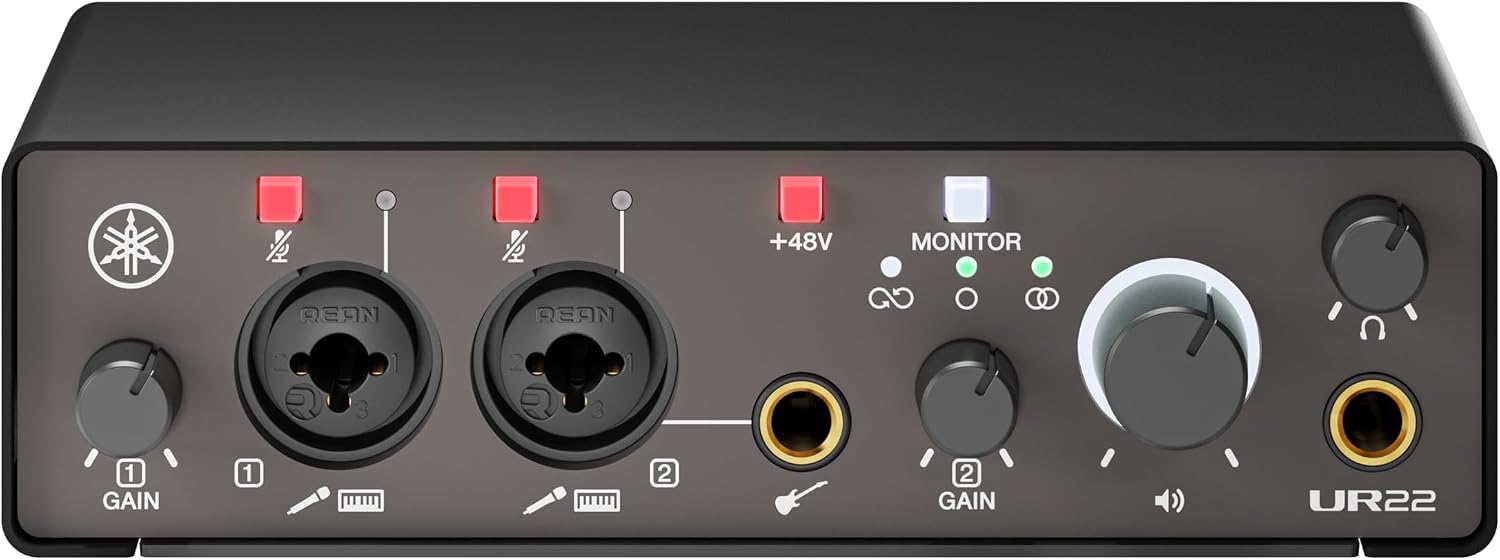
The UR22MK3 is the compact two-input choice for someone who wants recording and basic streaming functions without an elaborate control surface. Its two microphone/line combo inputs and dedicated high-impedance guitar input cover a vocal, an instrument or a two-microphone session. The guitar socket shares the second recording channel; it is not a third simultaneous input.
Yamaha gives it UR microphone preamps, 48V phantom power and input mute buttons. Those are practical controls for keeping a microphone connected while managing when it is heard. The metal enclosure is small enough for a crowded desk, and the USB-C connection keeps the setup straightforward with a compatible computer.
Direct monitoring lets the live inputs be heard through the hardware, while loopback can bring computer playback into a stream. These serve different jobs: monitoring helps the performer hear the live source, and loopback routes playback back toward the recording or streaming application. Its 24-bit/192kHz capability leaves plenty of format choice without making the highest rate necessary for everyday work.
The attraction is a concise set of useful recording and streaming features in a compact unit. It is still a two-input interface, not a multitrack mixer or an expandable rack system. For a home setup centered on a voice and instrument—or two microphones—that simplicity is a good part of its appeal.
Pros
- Two mic/line inputs plus a dedicated guitar connection for channel 2
- Input mute controls, direct monitoring and loopback
- Compact metal case with USB-C connectivity
Cons
- Guitar and second combo socket share one input channel
- Limited to two simultaneous analog input channels
How to Choose the Best Audio Interface Under $300
What Is a Good Audio Interface?
A good interface supplies the connections, gain and monitoring your recording needs, with drivers that suit the computer. A compact two-input device can make serious recordings; a larger enclosure or a higher maximum sample rate does not automatically improve the performance in front of the microphone.
How Many Inputs?
Count the sources that must be recorded at the same time. One singer with an electric guitar may need one mic preamp and one instrument input. Two XLR microphones need two microphone preamps. A stereo keyboard normally uses two line inputs, not one. A mixer’s advertised input count does not necessarily equal the number of separate tracks it sends over USB.
Phantom Power
Many studio condenser microphones require 48V phantom power, but others use batteries or a separate supply. Check the microphone’s requirements and the interface’s specification. Dynamic microphones generally do not need phantom power, and ribbon microphones require particular care according to their manufacturer’s instructions.
Computer Compatibility
Check the exact interface generation and operating-system version on the manufacturer’s support page. USB-C describes a connector, not a guarantee of driver compatibility or better sound. Older USB interfaces can remain useful when supported; an unsupported driver can matter more than a preamp specification.
Software bundles and activation rules change. Choose the hardware for its recording features, and confirm current software eligibility separately, especially for used equipment. No interface guarantees that an old plug-in or DAW license can be registered again.
Mixing and Monitoring
Direct monitoring sends the live input to the headphones or speakers without the software-processing delay. To hear an amp simulator or other plug-in while performing, monitor through the DAW instead and choose a workable buffer setting. Avoid enabling two monitoring paths unintentionally, which can produce a doubled sound.
A mixer such as the 302USB makes physical balancing and EQ convenient, but its stereo recording commits those sources together. An interface with separate input channels leaves more freedom to edit the balance afterward. Choose the workflow that suits the job rather than the largest number of knobs.
The Best Audio Interface Under $300: The Takeaway
The Scarlett Solo 2nd Gen remains the straightforward overall pick for one microphone and an instrument. Choose the original 2i2 for a simple two-microphone arrangement, the XENYX 302USB for hands-on stereo mixing, the MOTU M2 when detailed metering and MIDI are useful, or the Yamaha UR22MK3 for a compact recording and streaming setup.
Start with the sources you need to connect and the monitoring controls you will use every day. That is a more useful way to spend this budget than chasing the highest sample rate or a long list of promotional software.