Looking for the best scratch mixer on a budget? Start with the crossfader: a useful cutting curve and a clear layout matter more than a long list of effects. The right mixer should also connect the turntables or players you actually use, with headphone cueing that makes practice comfortable.

These four mixers cover different priorities. The Numark M2 keeps the setup simple, the Roland DJ-99 puts a mini innoFADER in a traditional two-channel layout, and the Behringer DX626 adds a third channel. Numark Scratch is the more capable choice for a Serato-based setup, with a built-in interface and performance controls.
Best Affordable Scratch Mixers
Numark M2 2-Channel Scratch DJ Mixer (Editor’s Choice)
The M2 is the straightforward starting point for a pair of turntables or other external players. There are no performance pads or software menus competing for attention: two channel strips, a crossfader and clear cueing controls keep the essential moves easy to find. That focused layout makes it the overall pick here for learning the fundamentals with a conventional setup.
Its replaceable crossfader has reverse and slope controls, so the cut can be adapted to scratching or smoother blends. Three-band EQ and gain on each channel help balance records, while switchable phono/line inputs accommodate turntables or line-level sources. Separate master and record RCA outputs are useful for feeding the sound system and capturing a set.
The simplicity is also the limit. There is no built-in USB audio interface, onboard effects section or Serato DVS integration; a computer-based setup needs additional suitable hardware. Choose the M2 for direct, uncomplicated control of external sources rather than an all-in-one digital workflow.
Pros
- Replaceable crossfader with reverse and slope controls.
- Three-band channel EQ and flexible phono/line inputs.
- Separate master and record outputs.
Cons
- No built-in USB audio interface or DVS integration.
- No performance pads or onboard effects section.
Roland DJ-99 2-Channel Scratch DJ Mixer

The DJ-99 puts the crossfader at the center of a compact, traditional two-channel layout. Its mini innoFADER is the main attraction for scratch work, with curve and reverse controls for tailoring the cut. The distinctive TR-909-inspired finish adds personality without replacing the practical controls underneath.
Each channel has three-band EQ, and both channel faders have their own curve and reverse adjustments. Dedicated DVS send and return connections let the mixer work with an external digital-vinyl interface. Separate booth output and two headphone socket sizes are useful touches when moving between a practice space and a larger setup.
Roland lists the DJ-99 as discontinued, so it is a legacy choice rather than a current-production recommendation. Its DVS connections are analog routing, not a built-in USB interface or an included software license. Choose it for the focused fader layout if a suitable unit is available; the official product details are the best starting point for checking its connections.
Pros
- Mini innoFADER with adjustable curve and reverse.
- Channel-fader curve and reverse controls.
- Dedicated DVS routing, booth output and two headphone sizes.
Cons
- Discontinued model with limited current availability.
- DVS operation requires an external interface and appropriate software.
Behringer PRO MIXER DX626 3-Channel DJ Mixer

The DX626 makes more sense when a third source matters as much as scratching. Three stereo channels give it room for an additional player, and the channel EQ can cut frequency bands deeply for more deliberate transitions. It is a general-purpose DJ mixer with scratch-friendly basics rather than the most focused battle layout in this group.
The crossfader works between channels 2 and 3, which also have separate BPM displays. Those readouts are tempo references, not automatic beat synchronization. Channel 1 can switch to a microphone input, with manual talkover for announcements; headphone source buttons and a master/cue mix make it possible to prepare the next track without sending it to the audience.
The extra channel and monitoring options are useful for mixed duties, but there is no built-in USB audio interface, performance-pad section or adjustable scratch-curve control like those on the Numark M2. Choose it when conventional mixing, announcements and an extra source take priority over a specialized two-channel scratch workflow.
Pros
- Three stereo channels with gain and deep-cut EQ.
- Dual BPM displays for channels 2 and 3.
- Headphone cueing, manual talkover and separate booth output.
Cons
- Crossfader operates between channels 2 and 3 only.
- No built-in USB interface or dedicated scratch-curve adjustment.
Numark Scratch 2-Channel DJ Mixer
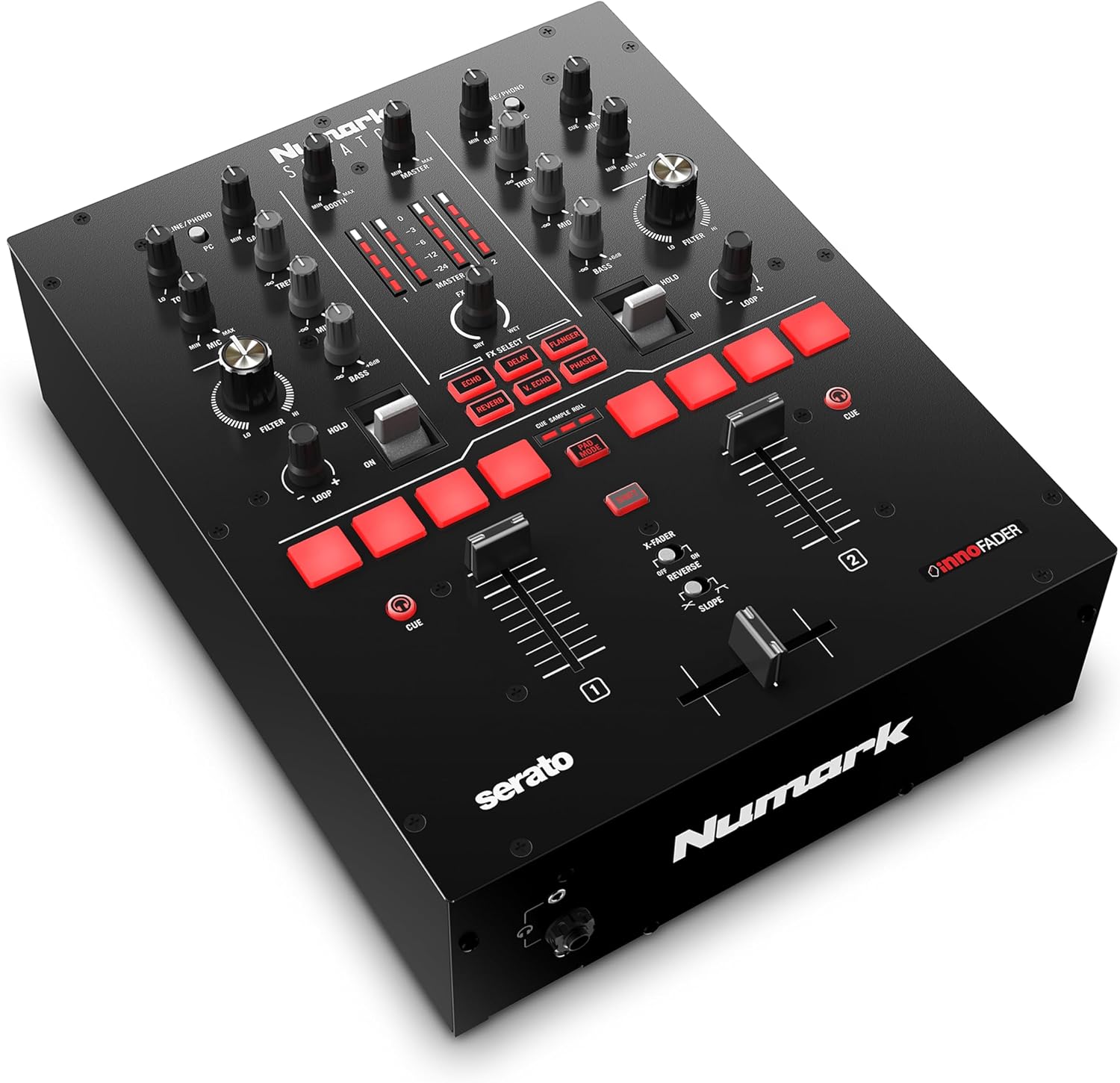
Numark Scratch is the step up for a setup built around Serato and turntables. Its InnoFader crossfader has reverse and slope switches, while the uncluttered two-channel layout leaves space for cutting. Unlike a compact controller, it accepts external phono and line sources and can mix them without a computer.
The USB interface enables the software side: Serato DJ Pro and DVS support, four performance pads per deck, loop controls and paddle-operated software effects. Channel filters also work when shaping external audio. Balanced XLR master outputs, a separately controlled booth output and both headphone socket sizes make it easier to connect a more developed rig.
The effects, pad functions and digital-vinyl workflow depend on the computer and compatible software; they are not a bank of standalone hardware effects. Control records or CDs for DVS are separate purchases. It is a bigger commitment than the M2, but the integrated interface and performance controls make it the more complete option when software is central to the set.
Pros
- InnoFader with reverse and scratch-curve control.
- Built-in USB interface with Serato and DVS support.
- Performance pads, FX paddles, channel filters and balanced XLR outputs.
Cons
- Software effects and performance functions require a computer.
- DVS control records or CDs are purchased separately.
FAQs About DJ Scratch Mixing
Do DJs Have to Scratch?
No. Scratching is an expressive technique with deep roots in hip-hop and turntablism, but many excellent DJ sets rely on selection, phrasing and blends instead. Learn it because it adds something useful to the music, not because it is a requirement for calling yourself a DJ.
Why Does the Crossfader Matter?
A sharp curve lets the sound enter quickly as the fader opens, which is useful for rhythmic cuts. A gentler curve suits longer blends. Reverse changes which deck is heard at each end of the travel. Those adjustments are more relevant to scratch technique than a large collection of decorative effects.
What Else Is Needed?
A mixer combines and controls sources; it does not supply the records, turntables or speakers. Conventional vinyl scratching needs a suitable turntable and cartridge, while digital vinyl adds a compatible interface, software and control media. Some mixers integrate the interface; others provide only analog routing. Match phono and line settings to the source, then set gain so the signal stays clear rather than clipping.
Is a Small Audio Mixer the Same Thing?
Not necessarily. A compact battery-powered audio mixer can combine music and microphones, but it may have no crossfader or phono inputs. For turntable scratching, check those functions before comparing size or portability.
How Should Beginners Practice?
Start with a short, clear sound and slow, repeatable movements. Practice the record hand and fader hand separately before combining them, then work against a steady beat. A clean, well-timed simple phrase contributes more than a complicated pattern that loses the rhythm.
So, Which Is the Best DJ Scratch Mixer?
The Numark M2 remains the practical overall starting choice for a straightforward external-source setup. Numark Scratch is the more capable route when Serato, DVS and performance controls are part of the plan. The DX626 suits broader mixing duties with an extra source, while Roland’s DJ-99 remains an interesting legacy option for its fader-focused design. Choose the workflow first; extra channels and effects only help when they serve it.