What is the best headset for CS:GO? Clear game audio, an intelligible microphone and a comfortable fit matter more than a long list of surround-sound claims. Although Counter-Strike 2 has succeeded CS:GO, those priorities still make a useful starting point for a Counter-Strike headset.

These four established wired designs take different approaches: open-back analog audio, USB processing, a detachable microphone, and an in-line amplifier. The reviews below explain the connections and practical trade-offs of each. They are older models, so software support and the ports on the gaming system deserve as much attention as the headset itself.
Top 4 Best Headsets for CS:GO
Sennheiser/EPOS GAME ONE Gaming Headset

The GAME ONE is the open-back option in this group. Instead of sealing the earcups, it allows air and sound to pass through the outer structure. That gives it a different listening character from a closed gaming headset and makes it an appealing design for a quiet room, where isolation is less important than an open, less enclosed feel.
Its practical controls are particularly well thought out: raise the microphone boom to mute it, and use the volume wheel on the right earcup without reaching for the computer. Plush velvet earpads provide a softer fabric contact surface than leatherette. The detachable analog cables support separate headphone/microphone connections or a compatible single headset socket.
The microphone is designed to reduce pickup of unwanted background sound, but that is separate from what the wearer hears. The open earcups let room noise in and game sound out, so this is not a noise-canceling headset for a busy shared space. It is also a wired analog model, without a USB sound card or wireless connection built into the headset.
Choose the GAME ONE for a quiet gaming desk and straightforward physical controls. Its open design is the reason to consider it, rather than a flaw to disguise with promises of isolation. The main compromise is privacy: people nearby may hear the game, and the player will still hear the room.
Pros
- Open-back design for a less enclosed listening experience
- Flip-to-mute microphone and right-earcup volume wheel
- Velvet earpads and detachable analog cables
Cons
- Lets room noise in and game sound out
- No built-in USB sound card or wireless connection
Razer Kraken 7.1 Chroma Gaming Headset

This is the original Kraken 7.1 Chroma USB headset, with round ear cushions, 40mm drivers and illuminated Razer logos. It is a wired computer headset: the USB cable carries audio and power, and there is no wireless mode to switch on. The distinctive lighting and retractable microphone give it a more overtly gaming-focused design than the GAME ONE.
The microphone slides into the left earcup when it is not needed. A mute button and indicator make it possible to stop transmitting without unplugging the headset. Foldable earcups help reduce its size for storage, while the adjustable padded headband and leatherette cushions provide the familiar closed-headset fit.
Razer designed its virtual 7.1 processing and lighting customization around the legacy Synapse software. These are software-dependent features, not seven separate speaker channels inside each earcup. On a modern system, check the supported software and operating system before making those controls the reason to choose this older headset; do not assume support from the current Synapse generation.
The Kraken suits someone who wants a USB connection, a retractable microphone and the original Chroma styling. Its round cushions and fixed USB cable are less flexible than the analog connections of some rivals. For positional audio, compare the game’s own headphone processing with any external surround effect rather than automatically stacking both.
Pros
- USB audio connection and retractable microphone
- Microphone mute indicator and foldable earcups
- Chroma lighting on the earcups
Cons
- Virtual surround and customization depend on legacy software
- Fixed USB connection rather than a standard analog headset plug
HyperX Cloud II Gaming Headset (Editor’s Choice)
The wired Cloud II combines a closed-back headset with a separate USB control box. The headset itself uses a 3.5mm connection, so the USB section is an option for the computer rather than the only way to connect. That flexibility is a useful advantage over a permanently USB-only design.
The 53mm drivers sit inside padded earcups, supported by an adjustable aluminum frame and a padded headband. Memory-foam cushions help the pads conform around the ears, although comfort still depends on head shape, glasses and the seal. The boom microphone detaches completely, making the headset easier to use for music or a game that does not need voice chat.
The USB box provides headphone and microphone level controls, microphone mute and a virtual 7.1 button. Start with stereo and compare the surround effect at a similar level; processing is a preference to assess, not a guarantee of better awareness in Counter-Strike. The closed cups provide passive isolation, not active noise cancellation, and the noise-reducing microphone does not cancel the room sound reaching the listener.
The Cloud II remains the overall pick for its combination of analog and USB connectivity, accessible controls and detachable microphone. Its main limitation is the attached headset cable: it is less convenient to replace than a fully detachable cable. It is a practical all-round wired design rather than a promise of perfect fit or a competitive advantage for every player.
Pros
- 3.5mm headset connection plus a USB control box
- Detachable microphone and memory-foam earpads
- Accessible volume, mute and virtual-surround controls
Cons
- Headset cable is attached rather than detachable
- Closed cups offer passive isolation, not active noise cancellation
Turtle Beach Ear Force X12 Arctic Camo Gaming Headset
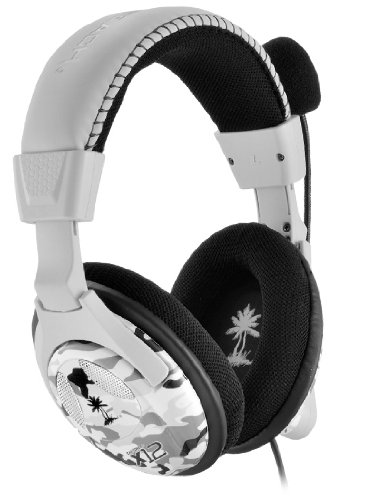
The X12 Arctic Camo keeps the original X12 idea: a stereo headset with a small in-line amplifier and physical controls on the cable. The white and gray camouflage finish gives this version a different appearance, while the 50mm drivers and fabric-covered cushions retain the familiar around-ear layout.
The amplifier provides game volume, bass boost and microphone mute, plus an Xbox 360 chat control for that console’s separate chat connection. On a PC, the game-volume dial acts as the overall game-and-chat volume; it is not an independent software chat mixer. Microphone monitoring lets the wearer hear their own voice, which can make it easier to avoid speaking unnecessarily loudly.
The connections are the important distinction. USB powers the amplifier, while separate green and pink 3.5mm plugs handle headphone audio and the microphone. It is not a single-cable USB audio headset. A computer with one combined headset socket needs the appropriate headset adapter, and the older Xbox 360 wiring should not be assumed to work directly with every modern console.
The X12 is most appealing for an older PC or Xbox 360 setup where its analog connections and physical bass control are useful. It is less tidy for a modern laptop with limited ports, and the long wired assembly needs managing around the desk. Its value is the simple amplified stereo layout, not wireless features, active noise cancellation or guaranteed silence from every USB power source.
Pros
- In-line amplifier with physical volume and bass controls
- Microphone monitoring and a mute switch
- 50mm drivers and fabric-covered ear cushions
Cons
- Needs USB power plus analog audio and microphone connections
- Older console wiring is not universally compatible with modern systems
How to Find the Best Headphones for CS:GO
Sound and Bass
For Counter-Strike, useful detail matters more than the biggest bass boost. Heavy low-frequency emphasis can make explosions impressive while competing with quieter cues. Begin with a moderate listening level and a simple stereo setup, then compare the game’s headphone or spatial-audio settings. Adding a second virtual-surround effect is not automatically an improvement.
Noise Control
Open-back headsets let sound travel in both directions; closed-back designs provide a physical barrier whose effectiveness depends on the seal. Neither “noise-canceling microphone” nor “closed-back” means that the headphones have active noise cancellation. Choose the GAME ONE for a quieter room and consider a closed design where sound leakage matters more. The separate guide to noise-canceling headphones explains another category of listening equipment.
Microphone
A useful gaming microphone needs clear placement, a convenient mute and sensible input levels. Position the capsule close enough to speak normally but away from the direct stream of breath. Test the result with a recording or a teammate. Aggressive noise gates can clip quiet words, and more microphone gain can bring more room noise into the conversation.
Comfort
Pad material, cup shape, headband pressure and glasses all affect the fit. Fabric can feel different from leatherette, but no pad guarantees cool ears or comfort for every head shape. Check that the cushions surround the ears without pressing awkwardly, and take breaks during long sessions rather than treating a comfort claim as a reason to ignore discomfort.
Design and Connections
Check what each cable actually does. A standard analog headset plug, separate headphone/microphone plugs and USB digital audio are different connections. USB can also supply power without carrying sound, as on the X12. For older models, confirm the software requirements before relying on lighting or virtual-surround controls. Useful controls and a suitable connection matter more than decorative lighting.
Final Thoughts: The Best Headset for CS:GO
The wired HyperX Cloud II remains the overall choice for its practical combination of analog and USB connections, detachable microphone and accessible controls. The GAME ONE is the open-back alternative for a quiet room, the Kraken Chroma offers USB audio with distinctive lighting, and the X12 Arctic Camo suits a compatible analog setup with an in-line amplifier. Match the connection and room first, then choose the fit and controls that make everyday gaming easier.