The best soundbar under $100 should make everyday TV viewing easier without turning setup into a project. Clearer dialogue, the right connection for the TV and convenient volume control matter more than a large wattage number or a long list of surround-sound claims.
For a separate soundbar comparison at a different budget limit, see Soundbar Under $200.
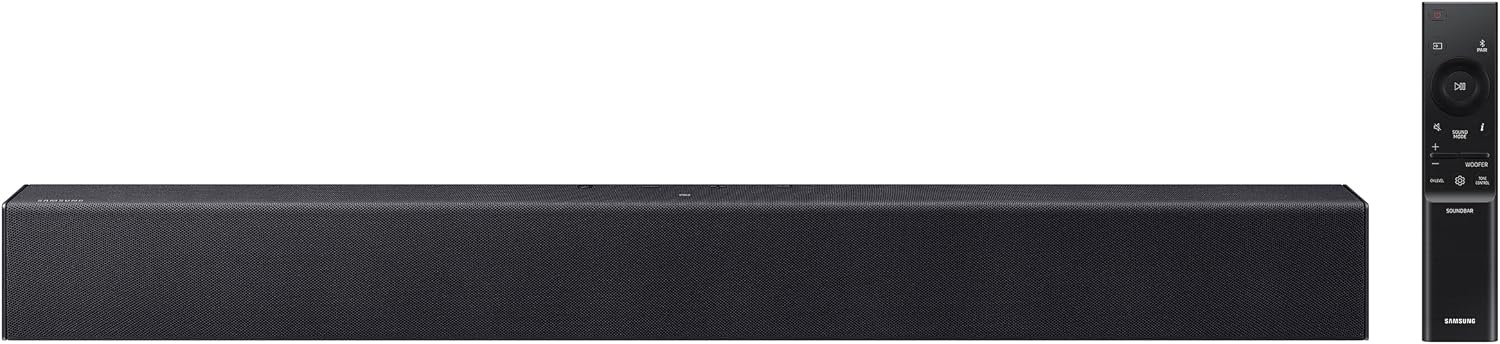
These compact budget options take different approaches: Samsung focuses on TV sound, Roku adds built-in streaming, Vizio uses an HDMI eARC-centered design, and the older RCA offers optical and analog inputs. Compare the current price with your budget and check the TV connection before choosing.
Best Soundbars Under $100 — Comparison Table
| Image | Model | Price |
|---|---|---|
 | Samsung HW-B400F (Editor's Choice) | Check Price |
 | Roku Streambar SE (Best for Built-in Streaming) | Check Price |
 | Vizio SV200M-08 | Check Price |
 | RCA RTS7131B | Check Price |
Samsung HW-B400F (Editor’s Choice)
The HW-B400F is the overall choice for a conventional TV-sound upgrade. Its two-channel, all-in-one design includes a built-in woofer, so there is no separate bass cabinet to place beside the furniture. The useful emphasis is everyday listening: clearer speech and a fuller presentation from one bar.
Voice Enhancement makes spoken dialogue easier to follow, while Night Mode reduces the level for quieter viewing. HDMI ARC and optical inputs provide two practical wired routes from a TV, and Bluetooth handles wireless audio from compatible devices. The supplied remote gives access to the sound settings; compatible Samsung TV remotes can also handle key functions.
The trade-off is scale. This is a compact stereo system, not a room of rear and height speakers, and its built-in woofer does not replace the deepest reach of a separate subwoofer. Choose the B400F for the useful combination of dialogue controls, wired connections and an included remote when a straightforward TV upgrade is the goal.
Pros
- Voice Enhancement and Night Mode.
- HDMI ARC, optical and Bluetooth connections.
- Built-in woofer and included remote.
Cons
- No separate subwoofer is included.
- Stereo layout does not provide discrete rear or height channels.
Roku Streambar SE (Best for Built-in Streaming)
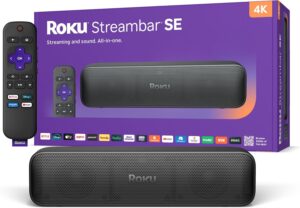
The Streambar SE is the most useful option here when the TV needs better sound and a streaming refresh together. Two speakers and a bass port share a small enclosure with a Roku 4K HDR streaming player. That makes it particularly appealing for a bedroom or a smaller television with an aging app platform.
Speech-clarity and volume-leveling settings address everyday frustrations such as quiet dialogue and abrupt changes in loudness. HDMI ARC provides the simplest TV-audio connection; on a TV without ARC, the included optical cable works alongside HDMI. The remote combines streaming control with volume and compatible TV-power control, reducing the need to juggle handsets.
Its compact size is convenient, but the two-speaker bar is not a full surround system or a large subwoofer. A Roku account and internet access are part of setting up the streaming features, and individual services may require subscriptions. Choose the SE when the built-in Roku player is useful rather than paying attention only to the soundbar half of the product.
Pros
- TV sound and 4K HDR streaming in one device.
- Speech clarity and volume-leveling options.
- HDMI ARC or HDMI-plus-optical setup.
Cons
- Streaming setup needs a Roku account and internet access.
- Small two-speaker enclosure limits room-filling scale and deep bass.
Vizio SV200M-08
The SV200M-08 is the streamlined choice for a compatible HDMI eARC television. Its two full-range drivers sit in a low-profile bar, with Dolby Atmos and DTS:X format support. The appeal is a clean, compact setup rather than adding a collection of separate speakers around the room.
TV-remote volume control over HDMI eARC keeps daily operation simple, while advanced adjustments use the Vizio mobile app and an account. QuickFit mounting can attach the bar to selected compatible Vizio televisions without a conventional wall-mount arrangement. Bluetooth adds a convenient route for music from a phone.
The important compromise is control and connection choice: a dedicated soundbar remote is sold separately, and there is no standard optical input on the bar. An older optical-only TV therefore calls for a different model or Vizio’s supported connection solution. Its format support also does not create discrete rear or overhead speakers. Choose it when eARC and app-based setup suit the household.
Pros
- HDMI eARC with compatible TV-remote volume control.
- Dolby Atmos and DTS:X format support.
- Bluetooth and QuickFit support for selected Vizio TVs.
Cons
- Dedicated remote sold separately; advanced app settings require an account.
- No standard optical input on the bar.
RCA RTS7131B
The older RTS7131B is worth considering when straightforward legacy connections matter more than modern HDMI integration. It combines an optical input, stereo RCA inputs and a 3.5 mm line input, giving older televisions and audio sources several ways to connect. Bluetooth adds wireless music playback from a compatible device.
Power, source and volume controls are available on the bar itself, so basic operation does not depend entirely on keeping the remote to hand. The remote adds bass and treble adjustment. The unit can sit on furniture or be wall-mounted with suitable hardware, and its low-profile format keeps the arrangement simple.
The limitation is its older connection scheme: there is no HDMI ARC, and the optical input accepts PCM rather than every TV surround format. Set a connected source to compatible PCM output if needed. Choose the RCA for its analog flexibility and basic controls, with expectations suited to a simple compact system rather than a modern surround installation.
Pros
- Optical, stereo RCA and 3.5 mm inputs.
- Bluetooth music playback.
- On-unit power, source and volume controls.
Cons
- No HDMI ARC connection.
- Optical input requires a compatible PCM signal.
How to Pick the Best Soundbar Under 100 Dollars
Start with the television’s audio output and the way volume will be controlled. A modest bar with the right connection is more useful than a feature-rich one that needs an unsupported adapter or an extra remote for every adjustment.
Quality of Sound
Dialogue clarity, listening distance and room size are better starting points than a wattage ranking. Small all-in-one bars can improve the focus of everyday TV sound, but deep bass and discrete sound from behind the listener require different hardware. Dolby Atmos or DTS:X support on a two-driver bar describes processing and format handling, not a set of physical height speakers.
Simple Setup
Use HDMI ARC or eARC when both devices support the required connection and TV-control functions. An ordinary HDMI socket does not necessarily return TV audio. Roku can use HDMI plus optical when ARC is absent; the RCA needs optical or analog audio. The Vizio’s eARC-centered connection deserves particular attention on an older TV.
Optical inputs can also have format limits. The RCA manual specifies PCM, so a source set to an incompatible Dolby or DTS bitstream may need its output changed. Place the soundbar without covering the TV’s remote sensor, and use suitable mounting hardware rather than assuming every wall bracket fits.
Remote
Check what is included and which controls remain available on the unit. Samsung and Roku include remotes; the Vizio’s dedicated soundbar remote is sold separately, with TV-volume and mobile-app control central to the setup. The RCA has buttons for basic operation as well as its separate remote. TV-remote integration depends on compatibility, not simply the presence of Bluetooth.
Wattage and Bluetooth Connectivity
Power figures quoted by different brands are not a reliable loudness or sound-quality comparison. Turn the level down if sound becomes strained or distorted.
Bluetooth is useful for music, but a wired TV connection is often the more predictable choice for lip sync and control. Do not assume a Bluetooth receiver can also transmit to headphones; check the exact feature supported by the model.
The Best Soundbar Under $100: Our Choice
The Samsung HW-B400F is the overall choice for useful TV-focused controls, a built-in woofer and both HDMI ARC and optical inputs. Roku’s Streambar SE makes more sense when built-in streaming is also wanted. The Vizio suits a compatible eARC-and-app setup, while the RCA remains a straightforward option for older optical and analog sources. Match the connection and control arrangement first, then check the current price against the budget.