The best Bluetooth transmitter for TV should match the television’s audio outputs and the headphones you want to use. These adapters send TV sound to wireless headphones or speakers, with different approaches to dual listening, volume control and newer Auracast devices.

The Sennheiser BT T100 remains the overall choice for a straightforward optical or analog setup, particularly with one compatible low-latency headset. The other options add useful alternatives, including a portable transmitter/receiver, remote volume control, a pairing display and Auracast broadcasting. Check the actual connections and listening mode before choosing.
The 6 Best Bluetooth Transmitters for TV
| Image | Model | Bluetooth | Price |
|---|---|---|---|
| Sennheiser BT T100 (Editor's Choice) | 4.2 | Check Price |
 | TROND BT-DUO | 5.0 | Check Price |
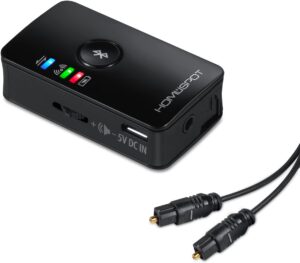 | HomeSpot BTADP-128-D | 5.0 | Check Price |
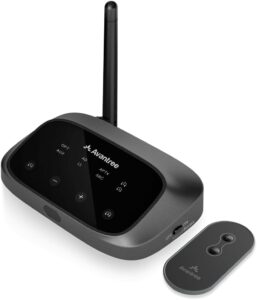 | Avantree Oasis Plus 2 | 5.3 | Check Price |
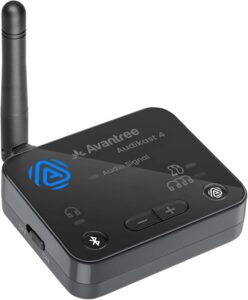 | Avantree Audikast 4 (Best for Auracast) | 5.4 | Check Price |
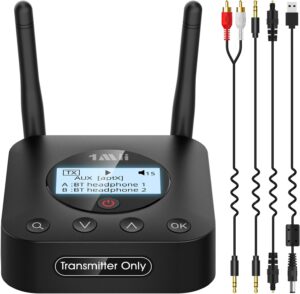 | 1Mii B06TX+ | 5.3 | Check Price |
Sennheiser BT T100 (Editor’s Choice)
The BT T100 earns the overall choice for its uncomplicated home-audio design. Optical and 3.5mm analog inputs cover two common TV outputs, and a physical selector chooses between them. The compact unit uses USB power and a simple pairing control, keeping a single-headphone setup pleasantly focused.
Its important advantage is aptX Low Latency support when the receiving headphones also support that codec. Sennheiser specifies that this low-latency mode applies to one headphone connection. The transmitter can connect two pairs, but aptX Low Latency is not available in that two-listener configuration.
The trade-off is therefore flexibility rather than basic connectivity. It has no receiver mode or on-device pairing screen, and optical input needs compatible PCM audio. Choose the T100 for straightforward private listening with a suitable headset; choose another approach if two low-latency listeners or more elaborate controls are essential.
Pros
- Optical and analog inputs with a physical selector.
- aptX Low Latency with one compatible headphone pair.
- Simple USB-powered home-audio format.
Cons
- aptX Low Latency is unavailable with two connected pairs.
- No receiver mode or pairing display.
TROND BT-DUO
The BT-DUO is the small, versatile analog option. A mode switch lets it transmit audio from a TV or receive Bluetooth audio for a wired system. Its built-in battery also makes it useful where a permanently powered tabletop transmitter would be inconvenient.
The 3.5mm connection keeps it straightforward, but it requires a suitable analog audio output. In transmitter mode it can connect two listening devices. TROND’s instructions state that dual-device playback falls back to SBC, so the single-headphone aptX Low Latency capability should not be mistaken for low-latency performance in every mode.
The compromise is the lack of optical input and onboard volume controls. Set the level through the appropriate source or receiving device, and use the correct TX or RX position. Choose the BT-DUO for portability and two-way usefulness when analog connections are available, rather than for a feature-rich optical TV installation.
Pros
- Compact transmitter and receiver modes.
- Built-in battery supports portable use.
- Can transmit to two listening devices.
Cons
- Dual-device transmission uses SBC.
- No optical input or onboard volume buttons.
HomeSpot BTADP-128-D
The BTADP-128-D is the HomeSpot to choose when the TV connection needs optical input. It also accepts an analog connection, giving it a useful role with different home-audio sources. The important distinction is the digital-input D model, with its TOSLINK connection.
Dual streaming is the useful feature here. Two aptX Low Latency receivers can retain that codec; other combinations may use aptX or SBC instead. That makes the HomeSpot interesting for a carefully matched pair of headphones, while the optical source still needs a compatible PCM format.
The trade-off is the relatively simple interface. A high/low level switch is not a separate volume control for each listener, so headphone controls remain important. Choose the HomeSpot for its input flexibility and documented dual-stream behavior, with both receiving devices checked for the desired codec.
Pros
- Optical TOSLINK and analog input options.
- Dual streaming can retain aptX Low Latency with two compatible receivers.
- High/low level adjustment.
Cons
- Two-listener latency depends on both receiving devices.
- No independent per-listener volume controls.
Avantree Oasis Plus 2
The Oasis Plus 2 is the convenience-focused choice for a living room. Its included remote lets the listener adjust volume without reaching behind the TV or getting up to the transmitter. Optical and AUX inputs cover common television outputs, while two headphone connections support shared listening.
A useful distinction is its optical soundbar passthrough arrangement, allowing a supported soundbar setup to work alongside Bluetooth headphones. This is an optical connection, not HDMI ARC or eARC. The physical input and output labels are worth following carefully when connecting the TV and soundbar.
The compromise is that more connections bring more setup decisions. Headphone codec support still affects delay, and an HDMI-only TV needs a suitable separate solution. Choose the Oasis Plus 2 for remote volume and an appropriate optical soundbar arrangement, rather than assuming the adapter can control every existing home-theater configuration.
Pros
- Remote volume control adds everyday convenience.
- Supports two Bluetooth headphones.
- Optical passthrough supports a suitable soundbar setup.
Cons
- No direct HDMI ARC/eARC connection.
- Headphone compatibility still determines latency behavior.
Avantree Audikast 4 (Best for Auracast)
The Audikast 4 is the forward-looking option for compatible Auracast listening devices. It offers a broadcast path for Auracast headphones, speakers or receivers alongside a separate Classic Bluetooth listening mode. That makes its appeal different from a conventional two-headphone transmitter.
Optical and AUX inputs connect it to a suitable TV audio output, with USB-C supplying power. The important limit is that Classic Bluetooth mode connects one headphone or speaker at a time. Shared listening through Auracast requires receiving devices that explicitly support that broadcast feature.
The trade-off is compatibility planning. A Bluetooth version number alone does not establish Auracast support, and this model does not provide a soundbar passthrough setup. Choose it when the receiving equipment supports the intended mode, especially for a system being built around Auracast rather than two ordinary Bluetooth headsets.
Pros
- Auracast broadcast option for compatible receivers.
- Separate Classic Bluetooth listening mode.
- Optical and AUX TV inputs.
Cons
- Classic Bluetooth mode supports one listening device.
- No soundbar passthrough; Auracast receivers must be compatible.
1Mii B06TX+
The B06TX+ puts the pairing process on a display. Instead of interpreting only flashing LEDs, the listener can search for nearby devices, select the intended headphones and confirm the connection. That is a useful practical advantage when several Bluetooth products are present in the room.
It supports two headphone connections and offers optical, coaxial and analog input options. The controls also provide an LL/HD mode selection. For aptX Low Latency, the receiving headphones must support the same codec; the display cannot make an incompatible headset use it.
The compromise is a larger tabletop format with more controls than a pocket adapter. It is a transmitter, not a receiver for streaming phone music into a wired stereo. Choose the B06TX+ when visible device selection and input flexibility matter, taking care to use the TV’s audio output and the correct digital format.
Pros
- Display makes device search and selection clearer.
- Optical, coaxial and analog input options.
- Two headphone connections and LL/HD mode selection.
Cons
- Transmitter-only design.
- Low-latency operation still requires compatible headphones.
How to Pick the Best Bluetooth Transmitter for TV
Sound Quality
A transmitter provides a wireless signal path; it does not restore detail missing from the source. The negotiated codec, headphone design, source level and connection quality all affect the result. A higher Bluetooth version number alone does not guarantee better sound or lower delay.
Pairing with Headsets
Put the headphones into their actual pairing mode and keep them close to the transmitter during setup. Temporarily disconnect another device, such as a phone, if it keeps taking the headphone connection. The transmitter connects to a TV audio output, rather than needing to appear in the TV’s own Bluetooth menu.
Pairing with Other Devices
Check the direction of the signal. Transmitter mode sends TV audio to headphones or a Bluetooth speaker. Receiver mode accepts Bluetooth audio for a wired system; only a model designed for that role can perform it. Do not assume a headphone microphone or two-way gaming chat will work through a stereo listening transmitter.
Dual Connectivity
Two simultaneous headphone connections are different from remembering two devices. Codec support can change when a second pair joins: the BT T100 loses aptX Low Latency, and the BT-DUO uses SBC. The HomeSpot can retain aptX Low Latency with two compatible receivers. Check both headphones and the transmitter’s exact mode.
Auracast is a separate broadcast approach requiring compatible receivers. The Audikast 4’s single Classic Bluetooth connection should not be confused with a conventional dual-headphone mode.
Delay
For aptX Low Latency, both ends must support that exact codec. Ordinary aptX or a Bluetooth version number is insufficient. Other low-latency approaches have their own compatibility requirements. Evaluate lip-sync with the intended TV and headphones, particularly if a soundbar also remains audible.
Setup
Use an audio OUT connection. Optical inputs commonly require the TV’s digital format set to PCM or stereo, rather than Dolby or DTS bitstream. A USB power cable does not automatically carry TV audio, and HDMI ARC/eARC requires a suitable extractor if the transmitter has no compatible input.
Simultaneous TV-speaker output depends on the television. An analog headphone socket may mute the speakers, while optical behavior varies by model. A supported passthrough arrangement can help with a soundbar, but it must match the transmitter’s documented connections.
The Best Bluetooth Transmitter for TV: Final Thoughts
The Sennheiser BT T100 remains the overall recommendation for straightforward optical or analog listening, particularly with one aptX Low Latency-compatible headset. Choose the TROND for portable analog TX/RX use, the HomeSpot for its documented dual-stream combinations, or the Oasis Plus 2 for remote volume and optical passthrough.
The Audikast 4 suits a compatible Auracast setup, while the B06TX+ makes device selection easier to see. The right choice starts with the TV’s outputs and the headphones’ supported modes, then the controls that make daily listening comfortable.