The best amp for Audio-Technica M50x depends on how you listen. A desktop USB DAC/amp can add a convenient volume knob and a dedicated headphone output, while a fitted Bluetooth adapter offers a different benefit: wireless listening. These four options cover both uses.
The ATH-M50x has a 38-ohm impedance and does not automatically need an expensive amplifier. If your source already delivers clean sound at a comfortable level, extra hardware may add convenience rather than a dramatic change in sound. Start with the connection or control you are missing.
The 4 Best Amps for ATH M50x
| Image | Model | Price |
|---|---|---|
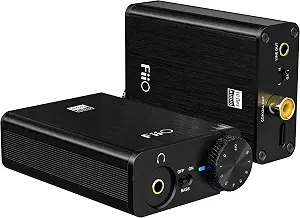
| FiiO E10K-TC (Editor's Choice) | Check Price |
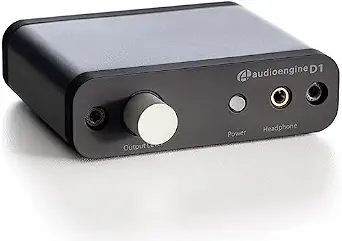 | Audioengine D1 | Check Price |
 | Syba Sonic SD-DAC63116 | Check Price |
 | FiiO BTA10 (Best for Wireless Listening) | Check Price |
FiiO E10K-TC (Editor’s Choice)
The E10K-TC is the most straightforward desktop partner here for the ATH-M50x. It gives a computer a dedicated USB DAC and headphone output, with a proper volume knob close to hand. Gain and bass switches provide useful adjustment without turning a simple listening setup into a collection of menus and apps.
The version linked here uses USB-C for audio and power. Its 3.5 mm headphone socket suits the M50x cable, while rear line and coaxial outputs leave room for other equipment. This is a practical upgrade when you need quieter output or better control; it is not guaranteed to change the sound of a computer that already drives your headphones cleanly. There is no battery to charge, but it does need USB power.
Pros
- USB-powered DAC and headphone amplifier
- Convenient volume knob with gain and bass switches
- Headphone, line and coaxial outputs
Cons
- Needs a suitable USB source
- No analog input or battery-powered operation
Audioengine D1
The D1 is the more flexible choice when your listening setup includes both headphones and powered speakers. USB and optical inputs let it accept digital audio from different types of source, while the headphone socket and RCA outputs make it useful as a small desktop audio hub. The front volume knob keeps adjustment within reach.
The current 32-bit D1 supports native USB playback up to 96 kHz and optical playback up to 192 kHz. Those are connection capabilities rather than a promise that a higher number will make every recording sound better. When using optical audio, the D1 still needs USB power. It is a good match for a desk that benefits from both input types, though a headphone-only setup may not need its extra connections.
Pros
- USB and optical audio inputs
- Headphone socket and RCA outputs
- Physical volume control for a desktop setup
Cons
- USB power is still required for optical listening
- No built-in Bluetooth input
Syba Sonic SD-DAC63116
The Syba Sonic packs several useful connections into a compact USB-powered box. It accepts USB audio and provides both 3.5 mm and 6.35 mm headphone sockets, so the M50x can connect with its normal cable or stereo adapter. RCA outputs also let it serve a powered-speaker setup rather than handling headphones alone.
Syba specifies support up to 24-bit/96 kHz and a shared microphone/analog line input. That input gives it a different role from a playback-only DAC when an appropriate microphone or analog source is part of your desk setup. The Mini-USB connection is older than USB-C, so cable choice matters.
Pros
- 3.5 mm and 6.35 mm headphone connections
- RCA outputs for compatible equipment
- Shared microphone/analog line input
Cons
- Older Mini-USB connector
- Some digital functions may need additional software setup
FiiO BTA10 (Best for Wireless Listening)
The BTA10 is the choice here for turning a wired ATH-M50x into a Bluetooth listening setup. Its shaped adapter attaches to the headphone instead of sitting on the desk, combining a Bluetooth receiver and small amplifier. Playback and volume controls mean you can leave the source device in a pocket more often.
FiiO specifies SBC, AAC, aptX and aptX Low Latency support, but the codec actually used depends on both devices. It is a useful option for casual wireless listening, while wired connection is the safer choice for latency-sensitive instrument monitoring. The built-in microphone supports calls; its cVc noise reduction concerns the microphone signal and does not give the M50x active noise cancellation. Choose the version made for the wired ATH-M50x, since the separate MSR7 adapter has a different fit.
Pros
- Adapter shaped for the wired ATH-M50x
- Bluetooth listening with playback controls
- Built-in microphone for calls
Cons
- Battery requires charging
- Bluetooth delay varies with the source and codec
Do You Need an Amp for ATH M50x?
Listen through your current source first. If you can reach a comfortable level without hiss, hum or obvious distortion, a separate amplifier is optional. A DAC/amp becomes more useful when you want to replace an unsatisfactory analog output, connect other equipment or add physical volume control.
The M50x is suitable for personal listening as well as monitoring. Neither its studio label nor its impedance means that a battery-powered source is automatically inadequate. Output capability, headphone sensitivity and the actual listening level matter more than whether a device plugs into the wall.
What Can a DAC Change?
A DAC converts digital audio into an analog signal. A USB DAC/amp moves that conversion and headphone amplification into an external device. It can solve a noisy-output problem, but it cannot guarantee a wider soundstage, recover details missing from a recording or transform the physical design of your headphones.
Wired or Wireless?
Wired USB options suit a fixed desk and avoid Bluetooth transmission delay. The BTA10 suits listening away from the desk, with the trade-off of charging and source-dependent codec support. For playing an instrument through software or monitoring live audio, favour a suitable wired connection.
Which Amplifier Should You Choose?
The FiiO E10K-TC remains the overall recommendation for a simple M50x computer setup. Choose the Audioengine D1 when optical input and powered-speaker connections are useful, or the Syba Sonic when its headphone sockets and shared input suit your equipment. The BTA10 is the distinct wireless option for the original wired ATH-M50x. Pick the device that solves a practical need instead of assuming that more amplification always produces better sound.